
Errors backing up VM using DPM 2016
You’ve added a Hyper-V VM onto DPM 2016 and the VM is failing to backup.
Replica creation fails with the following error “DPM failed to communicate with DPM Server Name because of a communication error with the protection agent. (ID 53 Details: Not implemented (0x80000001))
Subsequent Consistency check’s fail with the error “An unexpected error occurred while the job was running. (ID 104 Details: Unknown error (0x80041024) (0x80041024))\If you watch the VM in the Hyper-V manager you will see the snapshot attempt to be created but seems to fail around 9% and immediately merges the changes.

Solution:
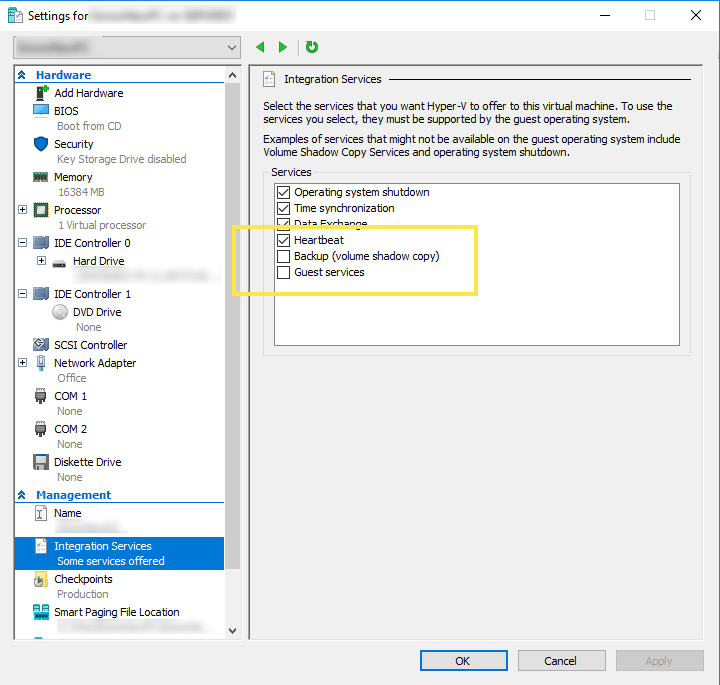
The simple solution to this is to edit the VM properties and uncheck the “Backup (volume shadow copy)” checkbox from the list of Integration Services.
Once this is done, re-run the Consistency check and it should work.

Simon Holman
.NET and Azure Developer
I write about .NET, Azure, and cloud development. Follow along for tips, tutorials, and best practices.
Related Posts
Resetting a DotNetNuke Host user password
A frequent question asked by customers is how to reset the DotNetNuke Host users password if you can’t remember what it is. If you have access to the database t
Ignore Azure Function false positive dependency failures using TelemetryInitializers
Let me start by saying that I love Appication Insights. The level of detail it gives you out of the box to monitor and troubleshoot application issues is
Handling new user registration with Auth0 and ASP.NET Core 3
When creating a new site that will have users logging into it, you'll invariably have to choose an identity provider to use. You can use the the inbuilt